
Simula
A local Telegram Bot API simulation environment for building, testing, and debugging Telegram bots with realtime runtime simulation and full API compatibility.
It provides a fully controlled local runtime that replaces the official Telegram Bot API server during development, enabling safe and isolated bot testing without relying on production Telegram infrastructure.
Explore the source code on GitHub → https://github.com/laraXgram/Simula
Introduction
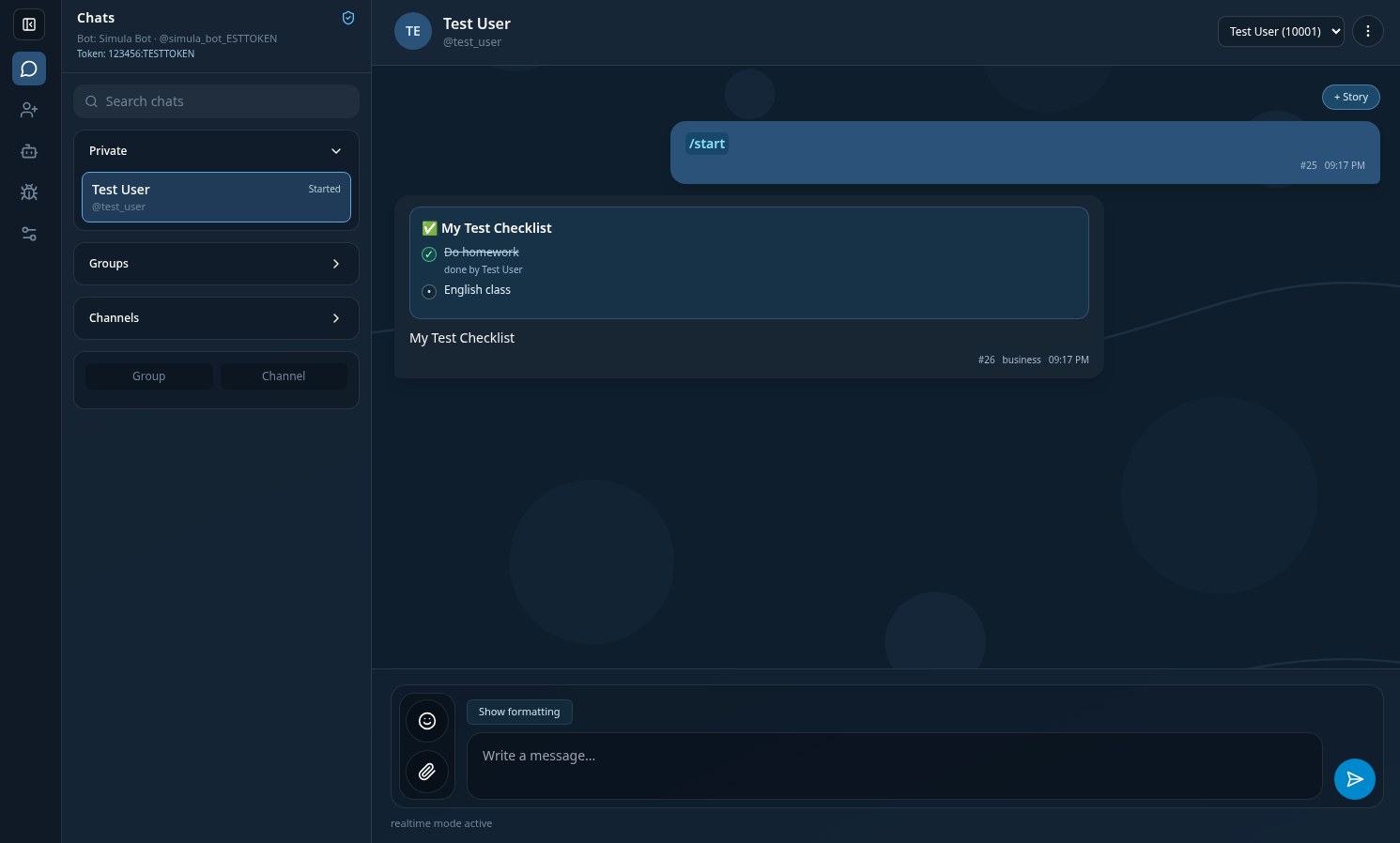
Simula acts as a drop-in development-time replacement for the official Telegram Bot API server and client, without requiring any modifications to existing bot implementations.
It allows developers to build and test Telegram bot integrations locally using any programming language, framework, or bot library. Instead of communicating with production Telegram services during development, bots interact with the Simula runtime, enabling faster iteration, safer debugging, and fully controlled testing workflows.
The simulation environment also supports experimentation with premium Telegram capabilities and Telegram Stars payment flows, which normally require real accounts and live transactions. These scenarios can be tested locally inside Simula without performing actual payments or interacting with production Telegram services, making it especially useful for integration testing, framework development, and advanced bot feature validation.
Simula is designed to isolate development workflows from production Telegram infrastructure while maintaining API compatibility.
Architecture Overview
Simula provides a local Telegram Bot API-compatible runtime consisting of:
- a simulated Bot API server
- a Telegram-like simulated client interface with support for web and upcoming desktop clients
- a realtime observability console
- a documentation-driven API scraper and code generator
Together, these components create a controlled development environment for testing Telegram bot integrations without interacting with production Telegram services.
Key Capabilities
Simula provides a complete local Bot API simulation workflow including:
- simulated Telegram client interface
- local Bot API server runtime
- realtime update streaming
- webhook and polling testing support
- Telegram Stars payment flow simulation
- premium feature experimentation
- structured runtime observability console
- reproducible Bot API interaction tracing
- trace bundle export/import for reproducible debugging
Use Cases
Simula is especially useful for:
- Telegram bot framework development
- webhook integration debugging
- Telegram Stars payment workflow testing
- premium feature experimentation
- offline bot development environments
- CI integration testing
- reproducible Bot API interaction debugging
Realtime Debug Console
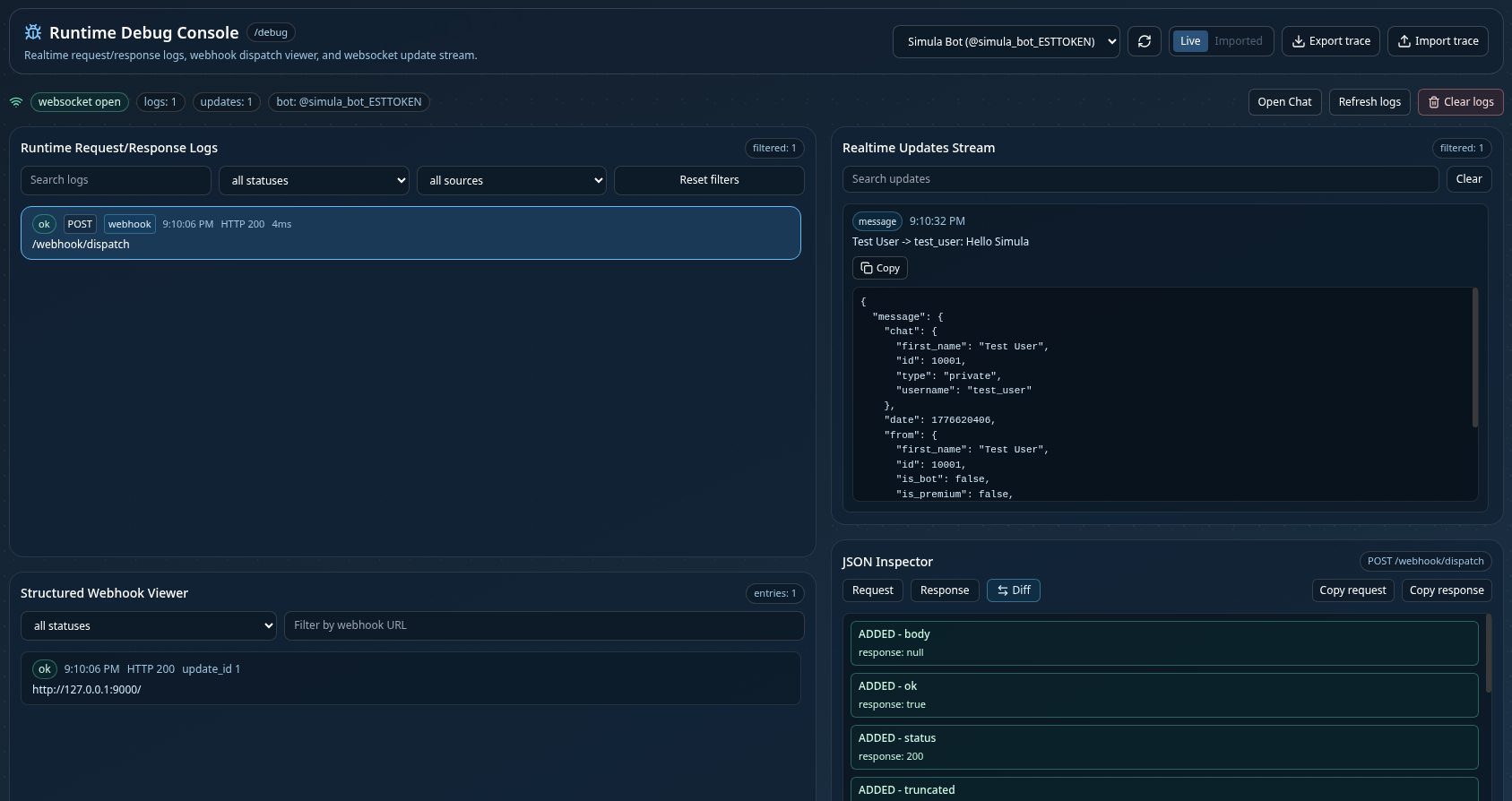
Simula provides a built-in realtime observability console for inspecting Bot API interactions end-to-end during development.
The debug console exposes a structured view of the runtime communication pipeline between bots and the simulated Telegram environment, allowing developers to trace requests, inspect responses, and monitor update delivery as they occur.
Available tooling includes:
- realtime request and response timeline visualization
- webhook delivery inspection with status filtering
- live websocket update stream monitoring
- structured JSON inspectors for payload analysis
- side-by-side request vs response diff viewer
- trace bundle export and import for reproducible debugging sessions
Trace bundles capture a portable snapshot of the runtime state, including:
- request/response logs
- websocket update streams
- selected bot token context
- active Bot API base URL
- export timestamps
These bundles can be shared across environments to reproduce integration issues, support bug reports, and perform offline investigation without requiring access to the original runtime instance.
Download
Get the latest prebuilt release for local development and testing.
| Version | Platform | Action |
|---|---|---|
| Latest | Web | Download |
Quick Start
Web
Download and extract the release package, then start both services using the included launcher:
Extract:
simula-web.zipRun:
run-web.shrun-web.batAfter startup:
| Service | Address |
|---|---|
| Client | http://127.0.0.1:8888 |
| API | http://127.0.0.1:8081 |
| Debug Console | http://127.0.0.1:8888/debug |
Both API and client start automatically. No external Telegram connectivity is required during development when using the Simula runtime.
Bots can connect to the Simula API endpoint using existing Telegram Bot API-compatible implementations without any code changes.
Docker Profiles
Simula ships with structured Docker environments for different workflows.
Release Profile
Production-like runtime:
./scripts/release-up.shManual equivalent:
docker compose --profile release run --rm scraper
docker compose --profile release up -d --build api-server client
Stop services:
docker compose --profile release downDev Profile
Hot-reload environment for active development:
docker compose --profile dev up --buildTest Profile
Run quality checks:
docker compose --profile test run --rm api-server-test
docker compose --profile test run --rm client-test
Scraper Profile
Scrape the official Telegram Bot API documentation and regenerate strongly-typed Rust and TypeScript bindings used by the simulator runtime.
docker compose --profile scraper run --rm scraperOutputs:
- Rust bindings
- TypeScript bindings
Runtime Data Persistence
Runtime data is stored using Docker volumes:
| Volume | Purpose |
|---|---|
| api-data | SQLite + runtime API state |
| api-files | uploaded media |
Backups stored locally:
backups/Backup
./scripts/backup.shRestore
Latest archive:
./scripts/restore.shSpecific archive:
./scripts/restore.sh simula_YYYYMMDD_HHMMSS.tgzIMPORTANT
Stop running services before restore.
Local Native Development
Scraper
cd scraper
pip install -r requirements.txt
python src/scraper.py
python src/generator.py
API Server
cd api-server
cargo run
Client
cd client
npm install
npm run dev